
Proposal: Adaptive music (FMOD-style, baked stems)
Milestone: unscheduled (editor tooling + audio runtime; Phase 3 of the Logic-style Music mode) · Status: proposal
(2026-10-18), its questions decided; PR A1 (shared logic and the song model) built, see
As built: A1; PR A2 (the runtime) built, see As built: A2; PR A3 (the bake) built, see
As built: A3; ADR 0196 (accepted) · Depends on:
Music editor (songs, SongEngine, Render), Audio (AudioServer, streaming, the
command queue), Editor (Music mode), the Phase 1 right-hand Browser and built-in effects
(docs/design/music-effects.md, not written yet) · Related: Project and GameHost
(editor link), Developer overlay, Sound designer
Problem
Section titled “Problem”Games can only play the music editor’s output as one rendered .ogg on an AudioPlayer
(music-editor.md, Non-goals). Game music is rarely one fixed loop: exploration should
build up as danger rises, combat should start on the next bar instead of cutting in, a boss needs its own section, and
a victory sting has to land on the beat. Today a game can only do this by hand: several renders, two players
cross-faded by script, and loop points and bar lengths copied around as numbers. FMOD Studio and Wwise solve this with
authored adaptive music: sections, layers, parameters and quantized transitions, all designed in the tool and driven
from game code by a few parameter values. The music editor already holds everything a song needs. It lacks the
adaptive structure and a runtime that plays it.
VST3 plugins exist only on the developer’s machine, and games never host them. The user has decided that games play baked stems: the editor renders one stem per layer per section, plus a manifest, and a runtime player mixes and transitions those stems live, beat-quantized, from parameters.
- Author adaptive music in the song editor, in the same
.msong:- Sections on the ruler (Intro, Explore, Combat, Boss, Outro), each looping or continuing to another.
- Parameters: continuous (
intensity0–1), discrete (wave1–5) and labeled (area= Calm/Combat/Boss), each with a default and a seek speed. - Layers: groups of tracks whose volume, and optionally a filter, follows curves over parameters (vertical re-mixing).
- Transitions: rules such as “when
area= Combat, go from Explore to Combat at the next bar”. Each rule can have fades, a transition segment and a stinger. - Stingers and markers.
- Hear it before baking. The editor’s live
SongEngineplays the adaptive logic. Parameter sliders audition it, with the same transition timing the game will have. - Bake in one command. It renders sample-aligned stems with their reverb and delay tails, writes an
.mmusicmanifest resource, and on later bakes renders again only what changed. - Play it in games with an
AdaptiveMusicPlayernode:SetParameter,Play/Stop,TriggerStinger,GoToSection, and signals for section, beat, bar and marker. Scheduling is sample-accurate on the audio thread. Stems are streamed, and steady-state playback allocates nothing. - Tweak a running game: drive its parameters from the editor’s Adaptive panel over the editor link, or from a dev overlay panel.
Non-goals (v1)
Section titled “Non-goals (v1)”- Tempo or time-signature changes between sections. Each song has one tempo and one signature (the music editor’s rule). The manifest leaves room to add a tempo per section later.
- Live synthesis at run time. Games never run instruments, sequencers or VST3. A curve over a parameter can only drive what the runtime can do on a baked stem: layer volume and a layer filter (see Curve targets).
- Generative or random note logic: random clip choice, weighted playlists, note-level variation. Random choice between alternative sections comes in v1.1 (see Decided questions).
- Positional (2D/3D) adaptive music, nested events, sidechain ducking of other buses, global parameters shared
between players, and middleware import (FMOD
.fspro, Wwise). - Audio Units, CLAP and similar; plugin support is unchanged.
Concepts
Section titled “Concepts”| FMOD Studio | Here | Notes |
|---|---|---|
| Event + timeline | An adaptive song: a .msong with an adaptive block | The arrangement stays the timeline |
| Parameter (continuous / discrete / labeled, seek speed) | Parameter on the song | The same three kinds; seek speed in units per second |
| Loop region, destination marker | Section on the Sections lane: a whole-bar range, looping or with a then | A section is both a loop region and a destination |
| Transition marker / region, quantization, condition | Transition rule: from → to, when, quantize | Ordered list; the first matching rule wins |
| Transition timeline | Transition segment: a section of kind transition, played once between from and to | |
| Multi-instrument layering + automation on a parameter | Layer (a group of tracks) + curves (layer volume or filter over a parameter) | Vertical re-mixing |
| Fade in/out on transitions | fadeOutBeats / fadeInBeats on a transition | In beats, so they follow the tempo |
| Stinger / one-shot | Stinger: a section of kind stinger, quantized, with an optional pickup | From code or from a transition |
| Marker / callback | Marker on the Sections lane (Marker signal); exit markers are transition points | |
| Built and banked in Studio | Bake → .mmusic + .ogg stems | The runtime never sees the song |
Overview
Section titled “Overview”flowchart TB
subgraph Editor["Editor (Music mode)"]
Model["Song model (.msong)<br/>tracks · clips · adaptive block"] --> Live["SongEngine (live preview)<br/>sequencer + MusicDirector + layer buses"]
Panel["Adaptive panel<br/>parameter sliders · layers · transitions"] -- "SetParameter" --> Live
Model --> Bake["SongBaker (offline)<br/>one render per (section, layer) + tails"]
Bake --> Files["Assets/Music/Theme.mmusic<br/>Assets/Music/Theme.stems/*.ogg"]
Panel -. "audition baked" .-> Inst["AdaptiveMusicInstance<br/>(editor AudioServer)"]
end
subgraph Game["Game"]
Res["AdaptiveMusic resource (.mmusic)"] --> Node["AdaptiveMusicPlayer node<br/>(game thread: MusicDirector)"]
Code["game code: SetParameter · TriggerStinger · GoToSection"] --> Node
Node -- "AudioCommands: start section at frame F,<br/>layer gains, stingers, stop" --> Voice
subgraph AT["Audio thread"]
Voice["MusicVoice: lanes · music clock · fades<br/>(Music bus)"]
end
Streamer["AudioStreamer (streaming thread)"] -- "per-lane sample rings" --> Voice
Voice -- "events: SectionStarted, Missed, Finished" --> Node
Node -- "signals: SectionStarted · Beat · Bar · Marker" --> Code
end
Files --> Res
Panel <-. "editor link v5: parameters, state" .-> Node
Overlay["Dev overlay: Music panel"] --> Node
The design rests on four decisions:
- One logic, two clocks. All adaptive decisions are made by a pure C#
MusicDirectorin the engine (MainframeEngine/Src/Audio/Music/): parameter smoothing, curve evaluation, rule selection and quantization. The editor’s live preview and the game both run this same code, so a transition lands on the same bar in both. - The game thread decides; the audio thread executes. The director runs on the game thread and schedules actions
at exact frames of the music clock, a little ahead of time. The audio thread’s
MusicVoicecarries them out sample-accurately and reports what happened. This follows the engine’s rule that the game thread owns logic and the audio thread only mixes (ADR 0033). - Stems are rendered in isolation. Each section is rendered per layer from a clean start. Its tail (reverb and delay after the end) is rendered as a separate one-shot. One run-time rule covers loop seams and transitions: whenever a section ends at its end, its tail plays over whatever comes next.
- Additive data. The adaptive data is a new
adaptiveblock in.msongplus alayerfield on tracks. A song without it behaves exactly as today, and an older editor keeps it unchanged.
The adaptive song model
Section titled “The adaptive song model”New editor types in MainframeEngine.Editor/Src/Music/Adaptive/ (SongAdaptive, SongSection, SongParameter,
SongLayer, SongCurve, SongTransition, SongMarker). The enums and condition types are the engine’s own (see
Shared logic), so the editor and the runtime cannot disagree about what a
value means.
{ "format": 1, "tempo": 120, "timeSignature": [4, 4], "ppq": 960, "tracks": [ { "id": "t1", "name": "Pads", "layer": "base", "kind": "instrument", "clips": [] }, { "id": "t2", "name": "Drums", "layer": "perc", "kind": "instrument", "clips": [] }, { "id": "t3", "name": "Brass", "layer": "combat", "kind": "instrument", "clips": [] } ], "adaptive": { "start": "intro", "output": "Assets/Music/Theme.mmusic", "tailSeconds": 4, "parameters": [ { "name": "intensity", "kind": "continuous", "min": 0, "max": 1, "default": 0, "seekSpeed": 0.5 }, { "name": "area", "kind": "labeled", "labels": ["Calm", "Combat", "Boss"], "default": 0 }, { "name": "wave", "kind": "discrete", "min": 1, "max": 5, "default": 1 } ], "sections": [ { "id": "intro", "name": "Intro", "kind": "section", "start": 0, "end": 15360, "loop": false, "then": "explore" }, { "id": "explore", "name": "Explore", "kind": "section", "start": 15360, "end": 76800, "loop": true }, { "id": "combat", "name": "Combat", "kind": "section", "start": 76800, "end": 138240, "loop": true }, { "id": "toboss", "name": "To Boss", "kind": "transition", "start": 138240, "end": 153600 }, { "id": "boss", "name": "Boss", "kind": "section", "start": 153600, "end": 215040, "loop": true }, { "id": "victory", "name": "Victory", "kind": "stinger", "start": 215040, "end": 230400, "quantize": "beat", "pickupBeats": 1 }, { "id": "outro", "name": "Outro", "kind": "section", "start": 230400, "end": 261120, "loop": false } ], "markers": [ { "id": "m1", "name": "drop", "tick": 107520, "exit": true } ], "layers": [ { "id": "base", "name": "Base", "color": "#3b82f6" }, { "id": "perc", "name": "Perc", "color": "#f59e0b" }, { "id": "combat", "name": "Combat", "color": "#ef4444", "filter": "lowpass" } ], "curves": [ { "layer": "perc", "target": "volume", "parameter": "intensity", "shape": "smooth", "points": [[0, -80], [0.3, -80], [0.5, 0], [1, 0]] }, { "layer": "combat", "target": "volume", "parameter": "intensity", "shape": "smooth", "points": [[0, -80], [0.5, -80], [0.8, 0], [1, 0]] }, { "layer": "combat", "target": "cutoff", "parameter": "intensity", "shape": "linear", "points": [[0.5, 800], [1, 20000]] } ], "transitions": [ { "from": ["explore"], "to": "combat", "when": { "all": [{ "parameter": "area", "op": "==", "value": "Combat" }] }, "quantize": "bar", "fadeOutBeats": 1 }, { "from": ["combat"], "to": "boss", "when": { "all": [{ "parameter": "area", "op": "==", "value": "Boss" }] }, "quantize": "exitMarker", "segment": "toboss" }, { "from": ["combat", "boss"], "to": "explore", "when": { "all": [{ "parameter": "area", "op": "==", "value": "Calm" }] }, "quantize": "bars", "every": 4, "stinger": "victory", "fadeOutBeats": 2 } ] }}Time and structure
- Ticks, as everywhere in the song. Section
start/endand markertickare ticks at the song’s PPQ. Sections start and end on bar lines; the editor snaps them, and the loader rounds stray values to the nearest bar with a warning. Whole bars make the beat/bar grid of every section unambiguous and keep every quantum inside a section. - Sections never overlap. Gaps between them are allowed (scratch material that is never baked). The kinds are:
section: playable and a transition destination.transition: played once by the rules that name it assegment.stinger: a one-shot overlay.
- Continuation.
loop: truerepeats the section until a transition fires.loop: falsewiththencontinues to that section at the end.loop: falsewithoutthenends the music after the tail; the player emitsFinished.
Layers
- A track names its layer with a new
layerfield onSongTrack. A track without one belongs to the implicit Main layer, which is always at full volume and has no curves. Each layer bakes to one stem per section. - Limit: at most 8 layers. Together with the incoming section during a transition, that is 16 continuous lanes per player.
Parameters
- Kinds:
- Continuous: a float in
[min, max]. - Discrete: integers in
[min, max]. - Labeled: an index into
labels. Code may pass the label or the index.
- Continuous: a float in
- Seek speed (units per second; 0 = instant) smooths continuous parameters only. Discrete and labeled ones always jump.
Curves
- Points are
[parameterValue, value]pairs sorted by parameter value; values outside the points hold the end values. - Shape:
linear, orsmooth(cosine ease between points). Over a discrete or labeled parameter, a curve is a step function: each integer or label takes the value of its point. - Several curves on one target multiply (volume) or take the minimum (low-pass cutoff), so
intensityandhealthcan both shape one layer. - Units: volume is in dB, where −80 dB or less is silence; interpolation happens in dB, so a cross-fade sounds even. The filter target is the cutoff in Hz, interpolated on a log scale.
Transitions
-
Matching:
fromlists source sections;"*"means any.whenis{ "all": [...] }or{ "any": [...] }of comparisons.opis== != < <= > >=, and avalueis a number or a label.- A rule without
whennever fires by itself, only throughGoToSection, which uses its settings.
-
Timing (
quantize):Value The transition happens at… immediatethe next block after the scheduling lookahead beatthe next beat barthe next bar bars+everythe next multiple of everybars from the section’s startsectionEndthe end of the current section exitMarkerthe next marker with exit: truein the current section, else the section end -
Entry:
entry: "start"(the default) enters the destination at its start."sync"enters at the same offset into the destination as into the source (wrapped to its length), for parallel arrangements. -
Fades:
fadeOutBeats(the outgoing layers fade after the boundary while the destination starts) andfadeInBeats. The default is 0 forsectionEndandexitMarkerexits, where the baked tail carries the decay, and ½ beat otherwise. -
Extras:
segmentnames a transition section to play once in between.stingernames a stinger to fire at the boundary.
Stingers and markers
- Stingers have their own
quantize(anything butsectionEnd/exitMarker) andpickupBeats: how many beats of the stinger come before the quantum, so an anacrusis lands its downbeat on the beat. - Markers are named ticks inside sections. Every marker emits
Marker(name)when the music crosses it. Markers withexit: trueare also transition points.
Back-compatibility. Every field is additive and nothing bumps the .msong format. The adaptive block and the
track layer are read through the existing [JsonExtensionData] Extra by an older editor and written back unchanged.
A song without adaptive plays, renders and loops exactly as today. Unknown ids (a curve on a deleted layer, a
transition to a missing section) are kept in the file, ignored with a warning in the Adaptive panel’s problems list,
and never fail a load.
Undo. Every adaptive edit is a SongDocument action, like note edits. Section and curve-point drags merge into
one entry. Moving a parameter slider to audition is not an edit; Set as Default makes the current value the
parameter’s default, as one undoable entry.
Validation runs on every snapshot. The results show in the Adaptive panel and fail a bake only where marked ✖:
- ✖ a section that is not whole bars, or that overlaps another
- ✖
startmissing, or not a playable section - a note that starts in one section and ends in the next (it is cut at the section end in the bake)
- an unreachable section
- a rule shadowed by an earlier one
- a stinger longer than 4 bars
- master inserts present (see Master chain)
Shared logic: MainframeEngine.Audio.Music
Section titled “Shared logic: MainframeEngine.Audio.Music”The engine owns everything both sides must agree on. These are pure C# types with no SoundFlow, no nodes and no allocation after construction:
| Type | What it does |
|---|---|
MusicGrid | Tempo and signature at a sample rate. FrameOfBeat(long beat) = round(beat × 60 × rate / tempo), computed once in double and rounded, so beat n is the same frame everywhere. NextQuantum(sectionFrame, quantize, every, markers). A section’s LengthFrames is FrameOfBeat(bars × beatsPerBar). |
MusicParameterSet | Values, targets and seek speeds per parameter; Advance(seconds) moves values towards targets; index lookup by name (dictionary built at load, so SetParameter("intensity", …) does not allocate). |
MusicCurve | Evaluates a compiled curve (sorted point arrays, shape) at a parameter value. |
MusicCondition / MusicRule | Compiled when trees (flat arrays) and the transition settings. |
MusicPlan | A manifest compiled once and shared by every instance: sections, layers, curves and rules by index, the grid, and the problems found (it never throws for bad data). EvaluateLayers and FirstMatchingRule. |
MusicDirector | The state machine: current section and its start on the music clock, the pending transition, layer targets. Update(now, earliest, actions) advances its prediction, re-evaluates the rules and writes the actions to schedule. It applies rule priority, cancels a pending transition whose rule stopped matching, and replaces one when an earlier rule matches. |
The music clock counts frames at the manifest’s sample rate from Play. It is independent of the device rate and
stops while paused. Every scheduled action is keyed by a music-clock frame.
Quantum eligibility. The director picks the first quantum at or after now + lookahead:
- In the editor’s live preview the director runs on the render thread itself, so
lookahead= 0. - In a game it is
AdaptiveMusicPlayer.ScheduleAhead(default 100 ms), plus the stream prefill time when a destination stem is streamed and not yet buffered (about 50 ms).
A boundary that falls inside the lookahead moves to the next quantum. With bars at 120 BPM (2 s) that is rare, and
with beat quantization it adds at most one beat.
Editor UX
Section titled “Editor UX”Sections lane and layers
Section titled “Sections lane and layers”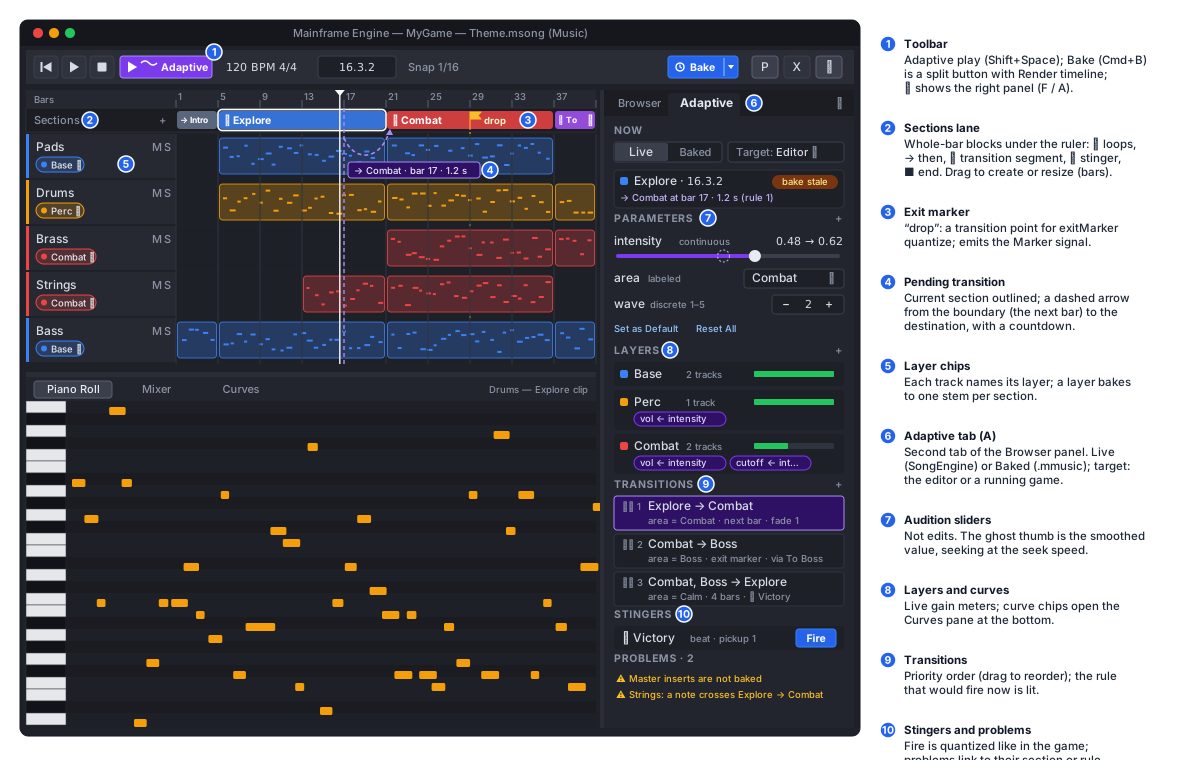
- Sections lane. A 22 dp lane under the ruler, part of the arrangement canvas (
SongCanvases, drawn in the sameSubViewport, so there are no extra RmlUi elements).- Drawing: a section is a coloured block with its name and an icon for its kind: loop ⟲, then → name, transition ⇢, stinger ✦, end ■.
- Editing: drag in an empty part to create a section (snapped to bars); drag a block to move it or its edges to resize. Double-click renames it.
- Right-click menu: Loop, Then ▸ (sections / End), Kind ▸, Set as Start, Add Marker, Delete.
- Markers are flags; drag one to move it, and Alt-click toggles
exit. - The loop region. It stays a timeline tool. Clicking a section block sets the loop region to that section, so ordinary Play loops it while it is being written.
- During adaptive playback:
- The current section is outlined, and the playhead follows the music, not the timeline.
- A pending transition shows as a dashed arrow from its boundary to the destination block, with the time left (”→ Combat · bar 9 · 1.2 s”).
- Layer chips. Each track header gets a chip in its layer’s colour. Click it to choose a layer, or New Layer…. Mixer strips show the same chip, and the Adaptive panel’s layer rows show the tracks they hold. Assigning a layer is one undoable entry.
The Adaptive panel
Section titled “The Adaptive panel”The right-hand panel from Phase 1 becomes a two-tab panel, Browser (F) | Adaptive (A); both share its width
and splitter. The Adaptive tab (Music/Adaptive/AdaptivePanel.cs, Assets/Editor/song_adaptive.rml) lists, top
to bottom:
- Now.
- Mode switch: Live | Baked (see Live preview).
- Target: Editor or a connected game’s player (see Editor link).
- State: the current section, bar.beat, and the pending transition with its countdown.
- Last bake: its time, and an “out of date” badge when the song changed since.
- Parameters. One row each: name, kind badge, and an audition control (a slider for continuous, a stepper for
discrete, a select for labeled) with the smoothed value drawn as a ghost thumb while it seeks.
- A popover edits the name, kind, range, labels, default and seek speed.
- Set as Default, and Reset All to the defaults.
- Audition values are kept per tab, not in the song.
- Layers. Colour, name, track count and a live gain meter (the evaluated layer gain). Curve chips such as “vol ← intensity” or “cutoff ← intensity” open the curve editor. + Curve adds one.
- Transitions.
- Rows read as sentences: “Explore → Combat · when area = Combat · next bar · fade 1 beat”. Drag them to reorder priority; click one to edit it in a popover (from, to, conditions, quantize/every, entry, fades, segment, stinger).
- The row that would fire now is highlighted, so a rule shadowed by an earlier one is visible.
- Stingers. Each has a Fire button (quantized like the game) and its quantize/pickup.
- Problems. The validation list; click a problem to select its section or rule.
The panel builds its rows only when the song version, the playback state or a parameter value changes (the Phase 1 Browser rule), so steady frames allocate nothing. RmlUi cannot nest lists, so condition lists are text in the rows and full controls only in the popover.
Curve editor
Section titled “Curve editor”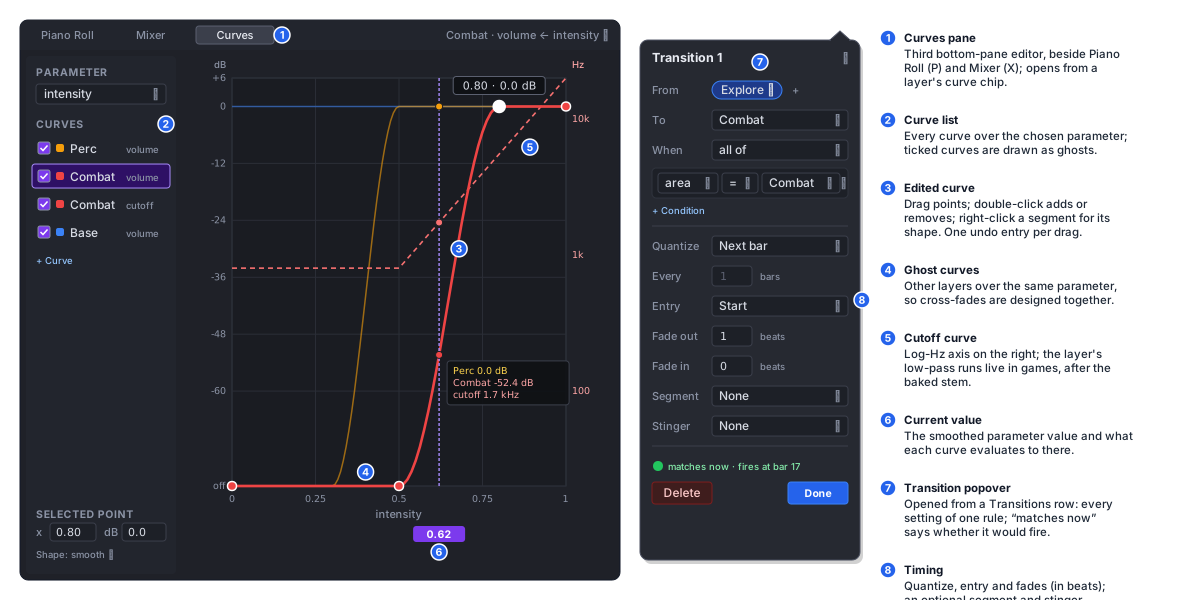
- Where it lives. A third bottom-pane editor, Curves, beside Piano Roll (P) and Mixer (X). It opens from a curve chip, and from View › Curves; it has no single-key shortcut in v1.
- Layout. An
EditorCanvas(like Phase 1’s EQ graph) with the parameter on x (labels as columns for labeled parameters) and the target on y: dB from −80 to +6 for volume, log Hz from 20 Hz to 20 kHz for cutoff. - What it draws:
- The curve being edited.
- The other layers’ curves over the same parameter, as ghosts, so cross-fades can be designed against each other.
- A vertical line at the parameter’s current (smoothed) value.
- Editing. Drag points; double-click to add or remove one. Shift constrains the drag to one axis. Right-click on a segment chooses its shape. Each drag is one undo entry.
- Live feedback. While the song plays in Live mode, the edit is heard at once (the curve compiles into the next snapshot).
Commands
Section titled “Commands”song.adaptive_play (Shift+Space) plays adaptively from the start section, or from the section under the playhead
with Alt. Plain Space keeps playing the timeline. The music shortcut table also gets:
| Command | Key |
|---|---|
| Adaptive tab | A |
| Bake | Cmd+B |
| Fire selected stinger | T |
The toolbar’s Render button becomes a split button: Bake (adaptive songs), with Render timeline to .ogg in its menu. Both stay in the Song menu.
Live preview in the SongEngine
Section titled “Live preview in the SongEngine”Two audition modes, switched in the Adaptive panel:
- Live (the default) plays the song model through
SongEngine. Edits are heard instantly, there is no bake, and plugins run. - Baked plays the last
.mmusicthrough a realAdaptiveMusicInstanceon the editor’sAudioServer. This is exactly what the game will play. Baked mode is greyed out when no bake exists.
How Live works:
- Snapshot.
SongSnapshotgains anAdaptiveSnapshot: section frame ranges, layer → track slots, and the compiledMusicDirectordata (built bySongSnapshotBuilderfrom the shared types, at the engine’s rate). - The director runs on the render thread with
lookahead= 0. Parameter changes from the panel areSetParametercommands on the engine’s existing lock-free command queue and apply at the next block. Seek speed advances per block. - Sequencing. The sequencer’s loop wrap becomes a section program. At a boundary frame the cursor jumps to the destination, held notes get their note-off there (as at a loop wrap today), and the director records the new section. A second overlay cursor sequences a stinger’s section range on top. Its notes go to the same track instruments, which are polyphonic.
- Layer buses. In adaptive mode tracks sum into one bus per layer, before the master. On that bus the engine
applies the layer filter (Phase 1’s
Svf, see Curve targets) and then the layer gain, ramped per sample. A track’s own inserts, volume and pan stay before the layer bus, which is the same order the bake uses. - Where Live and the bake differ.
- Same in both:
- transition timing: the same
MusicDirectorand the sameMusicGridrounding - layer gains and filter values
- continuations and loops
- transition timing: the same
- Different, by design:
- Mid-section exits. In Live, the outgoing notes are released at the boundary and their real effect tails
ring through the live inserts. Baked, the outgoing stems fade over
fadeOutBeats(the stems contain those notes’ full lengths). Live ignoresfadeOutBeats, because two positions on one track cannot have separate gains without a second set of instruments. - Fade-in. Live applies
fadeInBeatsto the layer buses, so the outgoing tails are faded in too. - Tails. Baked tails are cut at
tailSeconds.
- Mid-section exits. In Live, the outgoing notes are released at the boundary and their real effect tails
ring through the live inserts. Baked, the outgoing stems fade over
- Section-end transitions sound the same in both.
- Same in both:
- Determinism. Offline (
SongRenderer-style, block by block) the director makes the same decisions as live. A test pins a scripted parameter timeline to its section start frames and compares them with the runtime director’s (see Testing).
The bake
Section titled “The bake”Bake (Music/Adaptive/SongBaker.cs, SongBakeJob on a worker like SongRenderJob, --bake-song <path.msong>
for CI and just bake-song) turns the adaptive song into stems and a manifest.
What is rendered
Section titled “What is rendered”| Section kind | Rendered |
|---|---|
section, transition | per layer: a body stem, exactly the section’s LengthFrames, and a tail stem |
stinger | one mixed stem (all layers; layer gains do not apply to one-shots) with its tail appended |
A layer with no clip or note in a section bakes nothing for it, and the manifest records null, which plays as
silence.
Rendering a stem in isolation
Section titled “Rendering a stem in isolation”For section S = ticks [a, b) and layer L:
- Build a snapshot with only L’s tracks. Other layers’ tracks are left out, so their instruments do no work. Master volume is kept; master inserts are not (see Master chain).
- Start clean at a. Instruments and effects start fresh. Notes that start inside
[a, b)play. Notes that start beforeabelong to the earlier section and do not sound here (validation warns when a note crosses a boundary). Audio clips overlappingaare sliced at it. - Cut at b. Notes still held at
bget their note-off atb, exactly as at a loop wrap today. Their release, and every reverb and delay tail, rings out afterb. - Render on past b with the sequencer stopped, up to
tailSeconds(default 4). The plugin-delay-compensation latency of the chain is rendered first and dropped, so frame 0 of every stem is the section’s downbeat whatever the plugins’ latency. Frames[0, length)are the body; the rest is the tail. - Trim the tail at the last frame above −90 dBFS, plus a 10 ms fade. An all-silent tail is not written.
Sample alignment. All body stems of a section have exactly LengthFrames (from MusicGrid, the runtime’s own
rounding), so the layers stay aligned through any number of loops. The bake checks that each encoded stem decodes to
exactly that many frames: Vorbis granule positions keep decoded lengths exact, which the seamless song render already
relies on.
Loop seams and tails at run time
Section titled “Loop seams and tails at run time”A looping section’s body is rendered once, cleanly, not with the music editor’s render-twice fold. At the wrap the
player restarts the body and fires the section’s tail stems as one-shots over the restart. The result equals the
seamless render’s fold, and it is also correct the first time a section plays, when there is no previous pass to fold
in. The same rule handles every section-end exit: then continuations, sectionEnd transitions and the end of a
transition segment.
Mid-section exits (beat, bar, bars, immediate) have no baked tail at their boundary. The outgoing body
keeps playing under a linear fade of fadeOutBeats, and the stem’s own content supplies the decay. An exitMarker
exit gets a baked tail only if the marker is promoted to a tail point: the bake then also renders “cut at the
marker + tail” for that section (decided: see Decided questions).
Master chain
Section titled “Master chain”Master inserts (compressor, limiter, EQ) act on the sum of all layers, which no longer exists once the layers are
separate stems. An adaptive bake therefore bakes the master volume into every stem and does not bake master
inserts. The Adaptive panel flags them (“master effects are not baked; use the Music bus’s effects”), and adaptive
playback in Live mode bypasses them so it sounds like the bake; plain timeline Play still uses them. In a game, glue
compression belongs on the Music bus
(AudioBusLayout: the engine’s compressor, filters and reverb). This keeps the sum of a section’s stems equal to a
render of the section, which is the bake’s main test.
Curve targets
Section titled “Curve targets”Curves can only target what the runtime can do on a baked stem:
| Target | Runtime | Editor |
|---|---|---|
volume | layer gain, ramped per sample | layer bus gain |
cutoff (with the layer’s filter: lowpass or highpass) | a 12 dB/oct state-variable filter per lane | the same filter on the layer bus |
The layer is baked before its filter and gain, which are applied live. Phase 1’s DSP blocks (Svf, the smoothers)
live in the editor (Music/Effects/Dsp/). The filter moves into the engine (MainframeEngine/Src/Audio/Dsp/) and the
editor uses the engine’s copy, so both sides run the same filter code. Driving any other built-in effect parameter
from a game parameter would mean running that effect at run time; v1 does not (see Decided questions).
Output, names and UIDs
Section titled “Output, names and UIDs”Assets/Music/Theme.mmusic the manifest (mus_ UID, stable across bakes)Assets/Music/Theme.stems/explore.perc.3f9a1c.ogg body stem (name.layer.hash)Assets/Music/Theme.stems/explore.perc.3f9a1c.tail.ogg its tailAssets/Music/Theme.stems/victory.7b20e4.ogg stinger (one stem, tail included)- The manifest is the asset games reference.
.mmusicis a new extension with a new UID prefixmus(AssetUid.MusicPrefix,PrefixForExtension(".mmusic")). A re-bake reads the existing manifest’s UID and keeps it, so scenes that reference the music never break. - Stems are content-addressed. The short hash in the name comes from the stem’s inputs (see below). Stems get
ordinary
aud_UIDs from theAssetDatabase, and the manifest references them by UID and by path (the path is a fallback and for people). Nothing but the manifest references a stem. - Commit order makes bakes atomic. New stems are written to temporary names and moved into place. The manifest is
written last through
DurableFile, and then the stems the old manifest listed and the new one does not are deleted with their.meta. The bake only ever deletes files a previous manifest listed. A cancelled or failed bake leaves the previous manifest and all its stems intact, and a running game still streaming an old stem is not disturbed: a delete that fails because a file is open is retried at the next bake. - The folder is generated. The FileSystem panel shows
*.stems/folders collapsed with a “generated” badge, and the song’s.msonggets the “bake out of date” badge the way a render does today.
Incremental rebuild
Section titled “Incremental rebuild”Each stem’s input hash is a SHA-256 over a canonical JSON of everything that changes its samples:
- the bake format version, sample rate and encoder settings
- tempo and signature
- the section’s range and kind,
tailSeconds - the layer’s tracks: instrument with state, inserts with state, volume, pan, and the clips and notes that start in the section
- the contents of the audio files those clips use (size and modification time, then a content hash when those change)
- master volume
- the versions of the plugins involved, from the scan catalog, because a plugin update changes the sound
If Theme.stems/ already has a stem with that hash, it is reused. Editing a note in Combat/Perc re-renders one body
and one tail; changing the tempo re-renders everything. Parameter, curve, transition and marker edits re-render
nothing and rewrite only the manifest, so a re-bake after them is instant.
Bake job
Section titled “Bake job”- Progress and cancel. The splash shows progress (“Baking Theme… Combat/Perc 7 of 18”, cancellable). The Output panel gets the result: stems rendered and reused, the stream and memory counts, and the decoded memory one-shots will use at run time.
- Plugins. Plugin stems render through one offline helper, one stem after another, as Render does today. Stems
that use only built-in instruments render in parallel on up to
Environment.ProcessorCount − 1workers. - Failures. A missing plugin fails the bake with the list of affected stems. The bake never writes silence in
place of a missing plugin. Encoding uses the helper’s Vorbis encoder; without the helper, stems are written as
16-bit
.wavand a warning says so (the Render rule).
The .mmusic manifest
Section titled “The .mmusic manifest”{ "format": 1, "uid": "mus_8c1f…", "song": "sng_41aa…", "sampleRate": 48000, "tempo": 120, "timeSignature": [4, 4], "start": "intro", "parameters": [ { "name": "intensity", "kind": "continuous", "min": 0, "max": 1, "default": 0, "seekSpeed": 0.5 } ], "layers": [ { "id": "perc", "name": "Perc", "filter": null } ], "sections": [ { "id": "explore", "name": "Explore", "kind": "section", "bars": 16, "lengthFrames": 1536000, "loop": true, "then": null, "markers": [ { "name": "drop", "frame": 768000, "exit": true } ], "stems": { "perc": { "body": { "uid": "aud_…", "path": "Assets/Music/Theme.stems/explore.perc.3f9a1c.ogg" }, "tail": { "uid": "aud_…", "path": "Assets/Music/Theme.stems/explore.perc.3f9a1c.tail.ogg", "frames": 61440 } } } } ], "curves": [ { "layer": "perc", "target": "volume", "parameter": "intensity", "shape": "smooth", "points": [[0, -80], [0.5, 0]] } ], "transitions": [ { "from": ["explore"], "to": "combat", "when": { "all": [ { "parameter": "area", "op": "==", "value": "Combat" } ] }, "quantize": "bar" } ], "bake": { "editor": "0.1.212", "date": "2026-10-18T12:00:00Z", "inputs": { "explore/perc": "3f9a1c…" } }}- Frames, not ticks. Everything the runtime needs is precomputed in frames at
sampleRate: section lengths, marker frames, tail lengths. Tempo and signature come along for the beat grid and signals.bakeis ignored by games. - Versioned and forward-tolerant. It is versioned like
project.mfproj(migrations). Unknown fields are kept, and a section may later gain its owntempo, which is the hook for tempo changes in v2. - Read without reflection. It is read through a source-generated
JsonSerializerContext, the way saves are, so trimmed and AOT games can load it.
Runtime
Section titled “Runtime”All of it is in MainframeEngine/Src/Audio/Music/ (and Audio/Graph/ for the audio-thread part). Game code never
calls SoundFlow, and nothing outside Src/Audio does either.
AdaptiveMusic (resource)
Section titled “AdaptiveMusic (resource)”- Loading.
AdaptiveMusicImporter : IAssetImportermakes.mmusicloadable throughResourceLoader, so an[Export] AdaptiveMusic? Musicproperty references it bymus_UID like any asset. It parses the manifest, compiles the shared logic (grid, parameter set, curves, rules) into immutable arrays, and holds oneAudioStreamper stem. - Load modes:
- Body stems stream. A 30 s stereo section decodes to 11.5 MB, too much to keep a whole score in memory.
- Tails, stingers and transition segments are memory-loaded, decoded once at
Preload(), which the player does when it enters the tree. They must start at an exact frame with no prefill. - Overrides:
PreloadSections(a list of section ids) memory-loads chosen sections too, so transitions into them need no prefill.
- Failures. A missing stem file logs one error naming the section and layer and plays that lane as silence. The rest of the music keeps playing.
AdaptiveMusicPlayer (node)
Section titled “AdaptiveMusicPlayer (node)”AdaptiveMusicPlayer : Node is a thin node over a public AdaptiveMusicInstance. The instance is what the editor’s
Baked audition uses without a scene tree.
| Member | |
|---|---|
[Export] AdaptiveMusic? Music, Bus (“Music”), VolumeDb, Autoplay, StartSection ("" = the manifest’s) | |
[Export] float ScheduleAhead (0.1 s) | The scheduling lookahead (see Quantum eligibility) |
Play(string? section = null) | Starts at a section’s downbeat |
Stop(MusicQuantize quantize = Immediate, float fadeBeats = 0.5f) | Stops at a quantum; tails ring out |
SetParameter(string name, float value), SetParameter(string name, string label), SetParameter(int index, float value) | Clamped; continuous parameters seek. The int overload skips the name lookup |
SetParameterImmediate(…) | Skips the seek |
GetParameter(string name), GetParameterIndex(string name) | |
TriggerStinger(string name, MusicQuantize? quantize = null) | Uses the stinger’s quantize and pickup |
GoToSection(string name, MusicQuantize quantize = Bar, float fadeOutBeats = 0.5f) | Code-driven transition; replaces a pending one |
Playing, CurrentSection, PendingTransition | |
GetPosition() → MusicPosition | Section, bar, beat, beat fraction, seconds. Interpolated from the last reported clock and the frame time, minus the output latency estimate, for visual sync |
[Signal] SectionStarted(string section), Beat(int bar, int beat), Bar(int bar), Marker(string name), TransitionScheduled(string to, float seconds), Finished | Bars and beats are 1-based within the section. Signal arguments are the manifest’s preallocated strings, so raising them allocates nothing |
Like AudioPlayer, the node stops when it leaves the tree, follows its ProcessMode against SceneTree.Paused (the
music clock stops while paused), and is silent in the editor’s edit mode.
Threading
Section titled “Threading”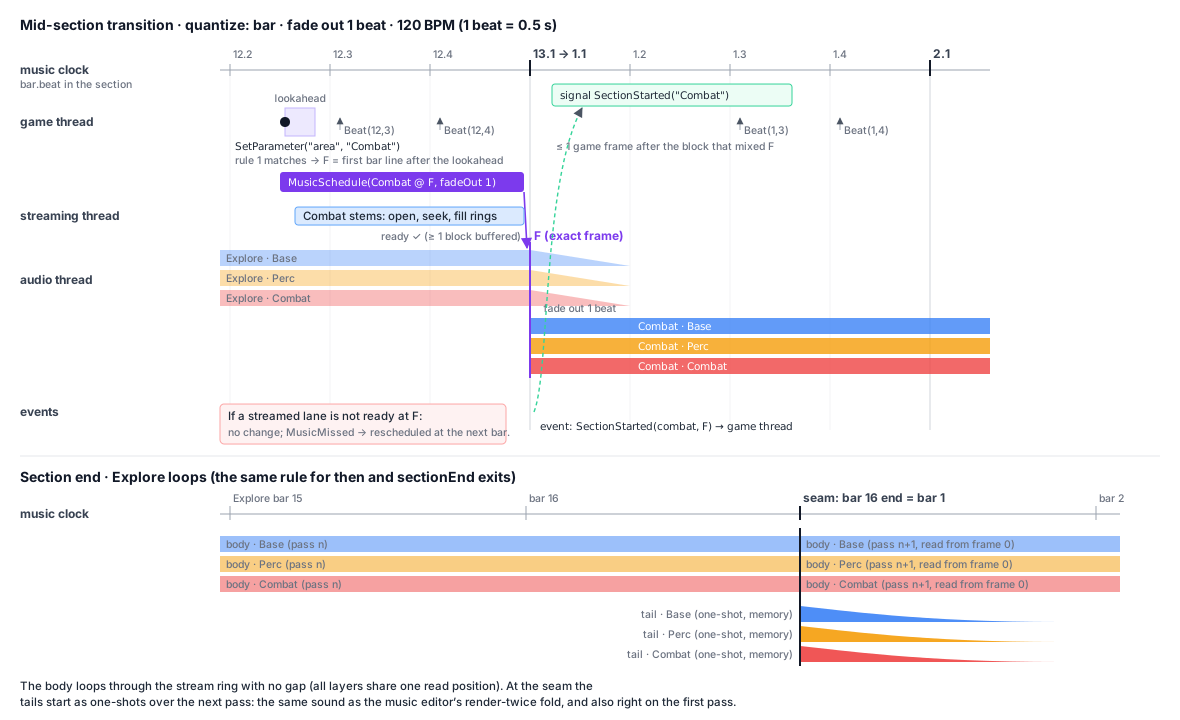
Game thread (AudioServer.Process, after transform sync), each frame for each playing instance:
-
Applies events from the audio thread: section started, transition executed or missed, stinger played, finished. It raises their signals.
-
Advances parameter seeks by the frame time and evaluates the curves. A layer gain or cutoff that changed is sent as one
MusicSetLayercommand per layer (coalesced, latest wins, likeSetVoiceParams). -
Runs
MusicDirector.Update(now, now + lookahead)withnow= the voice’s last reported music frame. Its actions become commands:MusicSchedule(start section S at music frame F, entry offset, fade-in and fade-out for the outgoing lanes, tails on/off)MusicCancel(a pending action by id)MusicStinger(stinger X at frame F)MusicStop
The game thread also asks the
AudioStreamerfor the destination’s streamed stems at their entry frames, so the rings fill before F. -
Raises
Beat,BarandMarkerfor every grid line or marker crossed since the last frame, derived from the reported clock. No per-beat traffic crosses the event ring.
Audio thread. MusicVoice is a SoundFlow component created up front in its bus’s mixer, like the pooled voices
(AudioBusInfo.MusicVoices, default 2 on Music, 0 elsewhere). Two voices are enough to cross-fade from one piece of
music to another. Each voice holds:
- Lanes. 16 continuous lanes: up to 8 layers for the current section plus 8 for an incoming one. Each lane has its
own
AudioStreamChannel(created lazily on the game thread, like a voice’s) or reads a memory clip. There are also 8 one-shot lanes for tails and stingers. - The music clock, advanced by
deviceFrames × (sampleRate / deviceRate). All lanes share one fractional read position per section instance and the same linear-interpolation step, so layers resampled from 48 kHz to 44.1 kHz stay sample-aligned. - A small action queue, sorted by frame (a fixed array of 32). Each block is split at every action frame, so an
action happens on its exact sample:
- section start (lanes retargeted, gain envelope from 0 or 1)
- outgoing fade (a linear ramp over the fade’s frames, then the lanes are released)
- tail and stinger one-shots
- stop
- Section ends. At the end of a section with no scheduled action at that frame, the voice follows the section’s
authored continuation from the
MusicSchedulethat started it: loop (rewind, fire the tails),then(start that section, fire the tails) or end. Authored flow keeps going even if the game thread stalls. The game thread prefetches thethensection’s streams when the section starts. - Per-lane processing: layer gain (target from
MusicSetLayer, ramped per sample over ~10 ms) × the fade envelope → optional SVF (cutoff ramped the same way) → sum. The voice’s volume and fader go throughBusProcessor, like any bus. - Readiness. At a scheduled start the voice checks that every streamed destination lane has at least one block
buffered. If one is not ready, the action is missed: nothing changes and a
MusicMissedevent goes back. The director then reschedules at the next eligible quantum, andStats.LateMusicTransitionscounts it. A miss is never half a transition. - Authority. The audio thread’s events are the truth. A pending transition is “pending” on the game thread until
its
SectionStartedevent arrives. AMusicCancelthat arrives after the frame has passed is ignored, and the director learns the outcome from the event. A cancel never undoes a transition that already happened.
Commands and events extend AudioCommand and AudioEvent with the music fields (instance index, generation,
action id, frame, section, entry offset, fade frames, layer gains) as plain values. Immutable plan data (the compiled
manifest and the stems’ sources) travels as the existing Ref, which the audio thread reads but never frees.
Streaming.
- Requests. A streamed lane is an ordinary
AudioStreamChannelrequest with the body’s loop points ([0, lengthFrames)). TheAudioStreamerrewinds at the loop end, so a looping section streams seamlessly. - Seeking costs. Entering at an offset (
entry: "sync") seeks the OGG, which decodes forward from the start (see Audio known issues). That is cheap for short sections and costly for long ones; the bake report lists sections over 60 s that aresyncdestinations. - Prefetch. At most the current and the incoming section’s layers are open at once (16 decoders per voice).
Allocation. Everything is created when an instance starts playing (the lanes, their channels, the action queue) or when the resource loads (the compiled plan). Steady playback, parameter changes, transitions, stingers, misses and pause/resume allocate nothing on the game thread, the audio thread or the streaming thread. An allocation gate test covers this (see Testing).
Faults. A music voice is mixed inside AudioMixRoot’s fault guard like everything else, so an exception silences
the audio for that graph but never crashes the process. A stem that fails to decode ends its lane only
(VoiceFailed-style, logged once).
Editor link and dev overlay
Section titled “Editor link and dev overlay”Editor link, protocol version 5.
- Editor → game commands:
WatchMusic/UnwatchMusic: the game only reports music state while some editor panel is watching.SetMusicParameter: argument<nodePath>\n<parameter>\n<value>; the value is a number or a label.TriggerMusicStingerandGoToMusicSection: argument<nodePath>\n<name>.ReloadMusic: argument amus_UID.
- Game → editor, a new
Musicmessage. It is latest-wins likeStatus, at up to 10 Hz while watched and only on change. For up to 8 playing instances it carries: node path, manifest UID, song UID, section, bar.beat, the pending transition and its countdown, and the parameter values. - The Adaptive panel’s Target menu lists Editor plus every connected game’s instances whose song UID matches the
open song.
- Targeting a game: the sliders and Fire buttons send commands, the Now row shows the game’s state, and the Sections lane draws the game’s position.
- Copy to Defaults turns the game’s current values into the parameters’ defaults, as one undo entry.
- Bake while a game plays. The editor sends
ReloadMusic. Players using that manifest load it in the background and switch at the next section boundary, continuing with the same section id when it still exists.
Dev overlay. A Music panel (DevOverlayPanels, registered when the first instance plays) shows each instance:
- the song, section, bar.beat and the pending transition with its countdown
- layer gain bars
- a slider, select or stepper per parameter, and Fire per stinger
- a Next button that takes the first matching transition now, quantized
Writes go through SetParameter, so they behave exactly like game code. The panel updates allocation-free, like the
Audio panel. Release builds keep it (the dev overlay is a development tool everywhere, F12).
Error handling
Section titled “Error handling”| Situation | Behaviour |
|---|---|
| Validation error (✖) in the adaptive song | the bake is refused with the list; Live preview skips the broken section or rule |
| Missing plugin during a bake | the bake fails listing the stems; the previous bake is intact |
| Bake cancelled or I/O failure | temp files deleted; the previous manifest and stems are untouched |
.mmusic from a newer format | loads read-only what it understands, warns once; unknown kinds play as silence |
| Stem file missing or undecodable at run time | that lane is silent, one error names the section and layer; the music goes on |
| Streamed lane not ready at a transition | the transition is missed and rescheduled at the next quantum (LateMusicTransitions) |
SetParameter with an unknown name or label | ignored, one warning per name (no exception in shipped games) |
GoToSection/TriggerStinger with an unknown name | ignored, one warning per name |
| No music voice free on the bus | Play fails like a rejected voice (Stats.Rejected), warning once |
| Device rate ≠ manifest rate | lanes resample together (aligned); quality as for streams |
Testing
Section titled “Testing”Shared logic (Tests/MainframeEngine.Tests/Audio/Music/):
MusicGrid: beat frames at a tempo whose frames per beat is not an integer (123 BPM at 48 kHz) round the same way everywhere. A section’s length equals the sum of its bars’ lengths with no drift after 1 000 loops.- Quantization:
- the next beat, bar,
bars/everyand section end from every position, including exactly on a boundary and inside the lookahead - an
exitMarkerexit with and without exit markers
- the next beat, bar,
- Conditions, rules and parameters:
- all/any conditions, labels as names and indices
- rule priority, a pending transition cancelled when its rule stops matching, and replaced by an earlier rule
- seek speed, and discrete and labeled parameters jumping
- Curves:
- linear and smooth shapes, interpolation in dB, log-Hz cutoff
- step curves over labels
- multiplication of several curves on one target
Runtime (on AudioDeviceMode.NullManual, deterministic):
- Synthetic stems:
- every section body is a constant DC per layer with an impulse at frame 0
- every tail is a decaying ramp
- every stinger is an impulse at its pickup point
- What they prove:
- Timing: transitions land on the exact output sample (the impulse’s position). Stingers put their downbeat on the quantum.
- Loops and tails: loop seams are continuous, and tails overlap the restart.
- Fades: fades are linear over the right number of frames. Layer gains ramp without zipper (< 0.005 per sample).
- Clock: pause and resume keep the clock.
- Resampling: two inverted copies of a stem on two layers cancel to silence at 44.1 kHz output, so the lanes are aligned.
- Misses: a fake streamer that holds a channel back makes the transition miss and land exactly one quantum later.
A late
MusicCanceldoes not undo an executed transition. - Signals:
Beat,Bar,MarkerandSectionStartedfire once each, in order, across frames of varying length, including several beats in one long frame. - Allocation gate:
AdaptiveMusicAllocationTests. It plays four layers through two transitions, a stinger, parameter sweeps, a miss and pause/resume, and requires 0 B on the game thread and the audio thread. The render-testshowcasescene also plays an adaptive player, so the frame allocation gate covers it in a real frame.
Editor (Tests/MainframeEngine.Editor.Tests/Music/Adaptive/):
- Model:
- JSON round trip of the
adaptiveblock and the tracklayer - an older editor’s
Extrapreserving them byte for byte - unknown ids kept
- each validation rule
- undo and merge of section and curve drags
- JSON round trip of the
- Live preview: a scripted parameter timeline rendered offline through
SongEnginegives pinned section start frames. The runtimeMusicDirectorwith lookahead 0 produces the same frames from the same script; this is the test that the editor and the game agree. - Bake:
- every body is exactly
lengthFrames - the sum of a section’s layer bodies equals a render of that section with all its layers, within 1e-6, before encoding
- tails continue the body without a gap
- a fake plugin with known latency leaves frame 0 on the downbeat
- every body is exactly
- Incremental bake, UIDs and atomicity:
- editing one note re-renders one body and one tail
- curve, rule and parameter edits re-render nothing
- the manifest’s
mus_UID survives a re-bake - stale stems are deleted, and only those
- a cancelled bake leaves the previous files untouched
- UI (workspace tests): Sections lane gestures (create, resize snapping to bars, rename, kind menu), layer chips,
the Adaptive panel rows and popovers, and the curve editor’s point drags as one undo entry each. Goldens: an
editor-music-adaptivecapture on both drivers. - QA:
editor-walkthrough.qaaddssong section,song layer,song paramandsong bakeverbs, and checks the captures by eye. - Link: round trips of the version 5 frames, and an old (version 4) game ignoring watch commands.
Demo: a new “Adaptive music” scene with an intensity slider, an area select and a stinger button, captured by
just demo-screenshots.
Performance budget
Section titled “Performance budget”| Where | Budget |
|---|---|
| Game thread, per instance per frame | < 2 µs (8 layers × 2 curves, rule re-evaluation only on change) |
| Audio thread, per 10 ms block | about 16 streamed lanes + 4 one-shots, comparable to 20 voices (≈ 40 µs on an M5) |
| Streaming thread | one Vorbis decoder per active lane: ≤ 8 steady, ≤ 16 during a transition |
| Memory | 256 KB ring per streamed lane; one-shots decoded, reported by the bake |
| Bake | about real time × layers for plugin stems, faster for built-ins in parallel; incremental re-bakes render only changed stems |
The benchmarks get an adaptive-instance frame and a 16-lane mix, with baselines in baseline.json.
Delivery
Section titled “Delivery”Six PRs, each usable on its own:
| PR | Contents | After |
|---|---|---|
| A1 — Shared logic | MainframeEngine/Src/Audio/Music/: MusicGrid, parameters, curves, conditions, rules, MusicDirector, the .mmusic manifest types and reader; the mus UID prefix; the editor’s adaptive model, layer field, validation and SongDocument actions (no UI). Tests. | — |
| A2 — Runtime | MusicVoice (lanes, clock, action queue, fades, filter), music commands and events, AudioBusInfo.MusicVoices, AdaptiveMusic + importer, AdaptiveMusicInstance, AdaptiveMusicPlayer + signals, the SVF moved to Src/Audio/Dsp/, allocation gate, benchmarks, the showcase render-test player. Tested with hand-written manifests and generated WAV stems. | A1 |
| A3 — Bake | SongBaker, SongBakeJob, isolation renders, tails, PDC trim, content-addressed stems, manifest writer, incremental hashes, atomic commit, --bake-song / just bake-song, FileSystem badges. | A1 (parallel with A2) |
| A4 — Editor: sections, layers, Live preview | Sections lane, markers, layer chips, the Adaptive tab (Now, Parameters, Layers, Transitions, Stingers, Problems), SongEngine adaptive mode (section program, overlay cursor, layer buses), Shift+Space, Bake split button. | A1 (A3 for the Bake button) |
| A5 — Curves, transition popover, Baked audition | The Curves pane, the transition popover, Live/Baked switch through AdaptiveMusicInstance. | A2, A4 |
| A6 — Link, overlay, Demo, docs | Editor link v5, the Target menu, ReloadMusic, dev overlay Music panel, the Demo scene, the as-built docs (audio.md Adaptive music section, editor.md Song tab, this proposal rewritten as docs/design/adaptive-music.md), the landing page’s DAW section and README with screenshots, milestone row. | A2, A5 |
A2 and A3 touch disjoint files and can run in parallel; A4 can start as soon as A1 lands. PRs A4 and A5 share
song.rml and the song panel with the Phase 1 Browser work, so they go after Phase 1’s Browser PR (C).
As built: A1
Section titled “As built: A1”A1 is in MainframeEngine/Src/Audio/Music/ (MusicTypes, MusicGrid, MusicParameterSet, MusicCurve, MusicPlan,
MusicDirector, MusicManifest) and MainframeEngine.Editor/Src/Music/Adaptive/ (SongAdaptive,
SongAdaptiveCompiler, SongAdaptiveValidator, SongDocument.Adaptive). It assumes the recommended answers to open
questions 2 (curves drive only layer volume and one filter) and 7 (.mmusic with the mus_ prefix).
MusicDirector API
Update(now, earliest, actions)writesMusicActions:StartSection,Stinger,StopandCancel.- Each
StartSectioncarries the continuation for the audio thread (Then), its fades, its entry offset and the tails flag.
Behaviour
- Rules every update. The director re-evaluates the rules on every
Update; this costs no allocation. - Committed transitions. A pending transition whose frame is before
earliestis committed and is never cancelled. - Misses.
OnMissed(id)rolls the prediction back to the state before the missed action. The next update schedules it again. - Ends of non-looping sections. A rule whose boundary would fall past the end of a non-looping section waits; the rules run again from the next section.
- Stinger pickups. The boundary is chosen so the whole pickup fits after
earliest. - Same decisions at any update rate. A test runs the director at the editor’s 256-frame blocks and at 800-frame game frames with the same parameter script; it starts the same sections on the same frames.
Song model
- Main layer.
SongAdaptiveCompiler.ToManifestmakes the implicit Main layer (first) only when some track bakes into it. - Markers become frames through
MusicGrid. - Validation errors are the ones marked ✖ in the model, plus two more: ids that are
not unique, and more than
MusicPlan.MaxLayerslayers.
Files and UIDs
.mmusicfiles are self-describing in theAssetDatabase: their UID is in the file.- The FileSystem’s reference fix-ups rewrite them in the project-file style.
- Open for A2:
ResourceLoaderskips importers for self-describing files, so A2’sAdaptiveMusicImporterneeds.mmusicrouted to it.
As built: A2
Section titled “As built: A2”A2 is the runtime: MainframeEngine/Src/Audio/Graph/MusicVoice.cs (audio thread), Src/Audio/AudioServer.Music.cs
(music voice slots, lane groups, stream requests), Src/Audio/Music/ (AdaptiveMusic + AdaptiveMusicImporter,
AdaptiveMusicInstance, AdaptiveMusicPlayer, MusicRuntime) and Src/Audio/Dsp/Svf.cs (moved from the editor’s
Music/Effects/Dsp/; the editor’s Filter and Phaser use it). It follows the Runtime design, with these
specifics and deviations.
Lane groups instead of 16 fixed lanes. A MusicVoice has 4 groups of 8 lanes (one lane per layer): the current
section, the incoming one, the outgoing one while it fades, and the prefetched continuation.
- Ownership. The game thread takes a free group for each section start and gets it back only when the audio thread
reports
MusicGroupFreed, so it never re-points lanes the audio thread may still read. With no free group, the start waits on the game thread and misses if it cannot be sent in time. - One stream generation per group. Every stream channel of a group is requested together (a silent or memory-loaded lane requests nothing), so one stream generation in the command names all of them.
- Channels are created at
Play. Every group gets a channel for each layer that streams in some section, so a playing instance allocates nothing afterwards. Each channel’s ring is 256 KB.
Continuations.
- Prefetch. The game thread streams the current pass’s
thensection into a free group (MusicPrefetch), unless a transition is scheduled at or before the section end. A prefetch at or before the reported clock is committed and never cancelled, because the audio thread handles that frame at its next block. - No readiness check. At the end, the audio thread starts the prefetched group without waiting. A streamed lane that is not ready plays silence and later skips the frames it missed, so the layers stay aligned. With no prefetch (a stalled game thread), the section plays silently and the timeline stays right.
- Stale prefetches are freed by the audio thread at the next section change.
Starting. Play holds the music clock at 0 until the first section’s streamed lanes have data, for at most 0.5 s.
The first section therefore never misses.
Misses. A start misses when its command arrives after its frame, when a streamed lane has fewer than 256 frames
buffered (unless the stream has ended), or when no group frees up in time. The miss goes back as MusicMissed, then
MusicDirector.OnMissed reschedules it, and AudioServerStats.LateMusicTransitions counts it. A late stinger misses
too. A late stop happens at once. A late cancel is ignored.
Clock and events. After each block the audio thread posts its events, then publishes the clock. The server reads every music clock before it drains the event ring, so an instance always has every event up to the clock it acts on.
Per lane.
- Gain. The layer gain is a one-pole ramp (~10 ms) per sample.
- Filter. The cutoff ramps the same way, but in ln(Hz), and its SVF coefficients (Butterworth Q) are recomputed every 32 frames while it moves.
- Fades are linear.
- Tails go through their layer’s gain and filter. A stinger’s mix stem goes through neither.
- One-shots. There are 8 one-shot lanes; when all are busy, the one furthest along is replaced.
Tail points (decision 4). AdaptiveMusic loads each marker’s baked tails (MusicManifestMarker.Tails, from A3)
into memory. Some transitions and stops leave a section mid-way, on a frame that is one of these markers. There:
- the outgoing body stops at that frame, ignoring the fade it asked for;
- the marker’s tails play from that frame, one per layer, through each layer’s gain and filter.
This is not limited to exitMarker exits: a bar or beat quantum that lands on a tail point uses it too, because the
baked tail is exactly what that cut sounds like. An exit marker without tails keeps the fade.
Stem rate. A stem whose sample rate differs from the manifest’s is not used. One error names it, and its lane is silent, because stems are resampled together and must share the manifest’s rate to stay aligned. The whole music is resampled to the device rate, sharing one read position per group.
Resource and loading.
- Loading.
AdaptiveMusic.LoadandFromManifest(for tests and the editor’s audition) are the entry points. - Preloading.
PreloadSectionsandPreload()load stems ahead;MissingStemsandLoadNoticereport on them. - Importer routing.
ResourceLoadernow sends self-describing files that have an importer (only.mmusic) to that importer, with the UID embedded in the file. This closes A1’s open item. - Stem lookup. A stem resolves by UID when the
AssetDatabaseknows it, else by path.
Buses. AudioBusInfo.MusicVoices defaults to −1 (automatic: 2 on the bus named Music, 0 elsewhere). It accepts
0–16, and GetBusLayout writes it as set. A layout swap stops playing music without Finished.
API beyond the table.
- Instance members.
AdaptiveMusicInstanceaddsStopImmediately(a 5 ms fade, noFinished),Paused,DirectorandVolumeDb. - The node.
AdaptiveMusicPlayer.Instanceis null in edit mode and outside the tree. - Position.
GetPositionsubtracts the output buffer length as the latency estimate.
Signals.
SectionStartedfires when the section changes, not when a section loops.- Order at one frame:
Bar, thenBeat, then anyMarker. Finishedfires once the last tails have rung out, and only for the authored end (not forStop).
Not in A2.
syncentry seeks the stream, which decodes forward from the start for OGG (the known issue above).- The editor link, the dev overlay panel and the Demo scene are A6.
Tests.
AdaptiveMusicRuntimeTestsrun on the manual null device with generated float-WAV stems (MusicTestStems: DC bodies with an impulse at frame 0, ramp tails, impulse stingers, at 480 BPM so a bar is 24 000 frames). They cover:- frame 0, loop seams with tails, rule transitions on the exact bar sample
- linear fades, curve gains without zipper (< 0.005 per sample), the cutoff curve, the stinger downbeat after its pickup
thenand the end withFinished, the signal order across uneven frames, pause holding the clock- inverted layers cancelling at 44.1 kHz, streamed loops and transitions
- a held streaming thread making the transition miss and land exactly one bar later, and a late cancel
- stop fades, a missing stem, and no free voice
- an exit at a tail point playing its tail on the exact frame with the body cut, and an exit marker without one still fading
AdaptiveMusicPlayerTestscover the importer and the UID, a scene round trip, the node in a tree (autoplay, signals, pause, leaving the tree, edit mode) and the bus layout.AdaptiveMusicAllocationTestsis the gate. Four layers (two filtered) go through every section, a transition segment leaving at a tail point, stingers, parameter sweeps, misses and tree pause, at 0 B.- The render-test
showcaseplays anAdaptiveMusicPlayerwith streamed 24 kHz stems, filter curves, transitions and a stinger, so the frame allocation gate covers it.
Performance (AdaptiveMusicBenchmarks, Apple M5, memory-loaded stems so the streaming thread does not pace the
benchmark), 0 B each:
| Benchmark | Mean | Budget |
|---|---|---|
InstanceFrame8Layers: one game frame of an instance (8 layers × 2 curves, a parameter moving every frame) | ≈ 0.38 µs | < 2 µs |
MixBlock480Frames16Lanes: a 10 ms block of 16 lanes (two sections cross-fading, half through the filter) | ≈ 42 µs | ≈ 40 µs |
Memory clips at the device rate on whole frames take a copy loop; anything else interpolates. Each lane is read, filtered and summed in three separate passes.
As built: A3
Section titled “As built: A3”A3 is MainframeEngine.Editor/Src/Music/Adaptive/ SongBaker (SongBaker.cs, SongBaker.Render.cs), SongBakeJob and
SongBakeCommand. It follows The bake with the decided answers to questions 1 (master inserts are
not baked), 3 (one stereo stem per layer per section), 4 (fades plus optional tail points), 5 (stingers are one mixed
stem) and 10 (explicit Bake, with an out-of-date badge).
Rendering
- Isolation.
SongBaker.RenderStem(song, section, layer)renders one stem the way the bake does; a null layer is the section’s mix (the isolation test sums the layers against it). The isolated song keeps only that layer’s unmuted tracks, and solo is ignored. It keeps the notes that start inside the section, cut at its end, and audio clips sliced to the section. Everything moves so the section starts at tick 0, so note frames use the same rounding asMusicGrid. Master volume is kept; master inserts are not. - A fresh engine per stem. Each stem gets a new
SongSnapshotBuilderandSongEngine, so instruments and effects start clean. The render runs past the cut bytailSeconds(at most 60 s). - Plugin delay compensation. The snapshot’s
MaxTrackLatencyis rendered first and dropped, so frame 0 is the downbeat. Master inserts would add latency, and they are not in the bake. - Tails are trimmed after the last frame above −90 dBFS, plus 10 ms. The last 10 ms of what is kept fade linearly to silence. An all-silent tail is not written.
- Workers. Stems without plugins render in parallel (
SongBakeOptions.MaxParallelism, defaultProcessorCount − 1). Plugin stems render one after another through one offlinePluginRack. Encodes go through the helper one at a time. - Failures. A stem that needs plugins fails the bake when there is no rack, or when a plugin cannot play; the error lists the stems. A reused stem needs no plugins.
Stems and the manifest
- Stems. Each stem’s float WAV is encoded by the plugin helper (
IPluginHost.Encode). The bake checks the frame count the helper reports against the expected length. Without a helper, stems are 16-bit.wavand a warning says so. - Names.
<section>.<layer>.<hash8>.oggwith.tail.oggfor its tail,<stinger>.<hash8>.ogg, and<section>.at-<marker>.<layer>.<hash8>.tail.oggfor tail points. Ids are made file-safe, and<hash8>is the first 8 hex digits of the input hash. - The manifest starts from
SongAdaptiveCompiler.ToManifestand is written with A1’sMusicManifestFormat.Write. Itsmus_UID is kept from the previous manifest. Each stem gets anaud_UID in its.meta, withloadModeset toStreamfor section bodies andMemoryfor tails, stingers and transition segments. An existing.metakeeps its UID. - Null stems. A layer with nothing in a section gets
nullinstems. A stinger has only"mix", whoseframesincludes its tail. - Tail points. A marker with
exit: trueand the newtail: true(SongMarker.Tail,SongDocument.SetMarkerTail; validation warns about a tail point that is not an exit) bakes “cut at the marker + tail” per layer. The tails go in the manifest marker’s newtailsmap (layer → stem, or null when silent;MusicManifestMarker.Tails). The runtime fires them like section-end tails when an exit leaves at that marker (see As built: A2). bakeblock:editor,date,inputs(key → full SHA-256, keyssection/layer,stinger/mix,section@marker/layer),files(each audio file’s size, modification time and SHA-256, so unchanged files are not hashed again) andstale(see below).
Incremental and atomic
- Input hash. It is a SHA-256 over canonical JSON: the bake version, rate and encoder, the section’s kind, range
and cut, its length and tail frames, the isolated song as
.msongJSON, the audio files’ hashes and the plugins’ catalog versions. The isolated song holds the stem’s tracks with their instruments, inserts and state, volume, pan, notes and clips, plus the master volume. - Reuse. A stem is reused when the previous manifest’s
inputshas the same hash for its key and its files are at the expected paths. Curve, parameter, transition and marker-name edits therefore render nothing, and only the manifest is written again. - Commit order. New stems are staged as
*.baking.tmpand moved into place only after every stem rendered. Then the manifest is written throughDurableFile, and then stale stems are deleted with their.meta. - Stale stems are the ones the previous manifest listed and this one does not. The new manifest lists them in
bake.stalebefore they are deleted, so a delete that fails (a game still streams the file) is retried at the next bake. - On failure or cancel the staged files and the stems this bake added are deleted. The previous manifest and its stems are left byte for byte.
Editor
- Bake command. File › Bake Adaptive Music (Cmd/Ctrl+B,
song.bake) runs aSongBakeJobon a worker. Choosing it again cancels; the menu item shows the progress, andSongBakeJob.Statusreads “Combat/Perc 7 of 18”. The result goes to the Output panel. The toolbar’s split button is A4. - Headless.
--bake-song <path.msong>(just bake-song <path>) bakes like the command, headless. - FileSystem. It badges an adaptive song whose
.mmusicis older than the song (FileBadges.BakeOutOfDate) and every*.stemsfolder (FileBadges.Generated, a wand icon).
Tests: Tests/MainframeEngine.Editor.Tests/Music/Adaptive/SongBakeTests.cs, with a deterministic test instrument,
WAV stems or FakePluginHost as the encoder, and no audio device. They cover:
- body lengths and null layers
- isolation summing to the section’s mix within 1e-6
- held notes cut at the end, with the tail continuing the body
- a fake plugin with 100 frames of latency keeping frame 0 on the downbeat
- re-bakes rendering only what changed and deleting only the stale stem, with the UID kept
- the manifest round trip through
MusicManifestFormatandMusicPlan - failed, mis-encoded and cancelled bakes leaving every file unchanged
- the command line and the job
As built: A4
Section titled “As built: A4”A4 is the editor’s adaptive UI and the Live preview. Baked audition (Live | Baked), the curve editor and the transition popover came in A5 (As built: A5); the editor link’s Target menu is A6.
Live preview (Music/Engine/SongEngine.Adaptive.cs, AdaptiveSnapshot)
- Snapshot. Each
SongSnapshotof an adaptive song carries anAdaptiveSnapshot: the plan compiled at the engine’s rate, each section’s song-frame range, each track slot’s layer and a freshMusicDirector, built on the UI thread. When a new snapshot arrives while the music plays, the render thread moves the state to its director (the section by id and its pass, every parameter’s value and target; a section that went away restarts at the start section), so edits apply without stopping and the render thread never allocates. - Each block runs
Update(now, now)once (no lookahead) and keeps the actions in a fixed queue (32) sorted by frame; the block is split at each action and at each section end, which follows the continuation the StartSection gave (loop, then, end). Held notes end at every boundary. A stinger plays its range on a second cursor with its own held notes.fadeInBeatsramps the layer buses after a transition;fadeOutBeatsand tails are the bake’s (the live inserts ring out). - Layer buses. Tracks sum per layer (after their inserts, volume and pan); each bus gets the layer’s
state-variable filter (the engine’s
Svf, shared with the runtime’s lanes) and its curve gain ramped per sample. Master inserts are bypassed; master volume stays. - State for the UI: section, pending destination and frames, the local frame, the stinger, layer gains and
parameter values, published lock-free after each block (
SongEngine.AdaptiveState,LayerGainDb,ParameterValue). The heard playhead maps the music clock through the last 16 blocks’ starts (SongPlayer). - Agreement with the game:
AdaptiveLiveTests.LiveDecisionsMatchTheRuntimeDirectorruns a parameter script through the engine and through a bare director updated at the same frames; every pass starts on the same frame. Steady adaptive blocks allocate nothing (SteadyAdaptiveBlocksAllocateNothing).
Editor
- Sections lane (
ArrangementCanvas.DrawSections,SongCanvasControllergesturesSectionNew,SectionMove,SectionStart,SectionEnd,MarkerMove; menus and renames inSongSections): as described in Sections lane and layers, with these choices: a drag previews and commits on release (one entry); moves and resizes stop at the neighbours instead of overlapping; choosing a Then turns the loop off (two entries); the kind symbols are drawn (the canvas font has no arrows). - Layer chips: a menu (Main, the layers, New Layer…, which is two entries: add and assign).
- Adaptive tab (
AdaptivePanel): a second tab of the right panel, Browser (F) | Adaptive (A), saved in the layout (MusicAdaptiveTab). Its markup is rebuilt only when the song, the selection, the playback state, the audition values or a bake changes; live values are written on change. Transitions are edited with menus on their chips (from, to, one condition, timing, fade): A5’s popover adds several conditions, entry, segment, stinger and fade-in. No Live | Baked switch and no Target menu yet. - Commands:
song.adaptive_play(Shift+Space),song.adaptive_play_here(Alt+Shift+Space),song.fire_stinger(T),song.make_adaptive,music.adaptive(A); the toolbar’s Render is Bake on adaptive songs with a split menu (song.render_menu). - QA verbs:
song adaptive-demo(SongAdaptiveDemo),song adaptive on|off,song adaptive-tab,song section,song marker,song layer,song param,song audition,song adaptive-play,song stinger,song bake. - Golden:
editor-music-adaptive(both drivers) with the allocation gate. It found the mixer’s per-frame track lookups allocating a closure (SongSnapshot.Find, alsoSongAdaptive.FindSectionand friends): now plain loops.
As built: A5
Section titled “As built: A5”A5 adds the Curves pane, the transition popover and Baked audition. The editor link’s Target menu, the dev overlay’s Music panel and the Demo scene are A6.
Curves pane (Music/Adaptive/SongCurves.cs for geometry and gestures, CurvesCanvas for drawing)
- Opening it. A third bottom pane, Curves, beside Piano roll and Mixer. Its switcher tab shows only on adaptive
songs. It opens from View › Curves (
song.curves; no single-key shortcut), from a curve chip in the Adaptive tab, or from a layer’s + Curve (a menu: volume or cutoff over each parameter, which adds a curve spanning the parameter’s range and opens it). - What it draws.
- The curve in its layer’s colour, with the other layers’ curves on the same parameter and target as ghosts.
- Its points, and a yellow line at the parameter’s current value: the baked instance’s value, else the live engine’s, else the audition value, else the default.
- Axes: dB −80…+6 for volume and log Hz 20 Hz–20 kHz for cutoff on y. On x, a labeled or discrete parameter gets one column per value and its curve draws as steps.
- Labels are cached per curve and song version, and steady frames allocate nothing.
- Gestures.
- Drag a point; Shift keeps the axis the mouse moved most on. Each drag is one entry (
SetCurvePointswith a merge key, ended on release). - Double-click empty ground to add a point, or a point to remove it; the last point stays.
- Right-click opens Linear, Smooth or Remove Curve. The shape belongs to the whole curve (
MusicCurveInfo.Shape), not to one segment, unlike the sketch above.
- Drag a point; Shift keeps the axis the mouse moved most on. Each drag is one entry (
- Hearing edits. In Live mode an edit is heard at once (the next snapshot). In Baked mode it is heard after the next bake.
Transition popover (AdaptivePanel.BuildRuleEditor, EditRule)
- Where it opens. RmlUi has no floating popovers that track a row, so the popover is an inline editor under its
rule row. It opens with the row’s gear button (
rule-edit), and one is open at a time. - What it edits. Every chip is one undoable
EditTransition:- From: toggles for any section, or several sections.
- To.
- Conditions: All of or Any of, then rows of parameter, operator and value. Values are chips for labeled parameters and a number field for the others. + Condition adds a row; × removes one. With no condition left, the rule fires only from code.
- Timing: quantize, plus every N for Bars.
- Entry: at its start, or in sync.
- Fades: fade-out and fade-in in beats.
- Segment and stinger.
- Glyphs. Operators are ASCII (
=,!=,<,<=, …), because the UI font has no ≠ ≤ ≥ glyphs.
Live | Baked (Music/Adaptive/BakedAudition.cs)
- The switch. Two chips in the Now row. Baked is greyed out until the song has a bake (and the editor an audio server).
- Playing the bake. Baked plays the song’s last
.mmusicthrough A2’sAdaptiveMusicInstanceon the editor’sAudioServer(the Music bus): the runtime code a game runs. The manifest is read again when its file changes, so a new bake is picked up on the next play. - Control. Audition values, Fire and Stop go to the instance.
- What follows it. The Now row, pending countdown, layer meters, ghost thumbs, firing rule, the Sections lane’s
outline and the playhead all read the instance’s state (section start +
GetPosition().Seconds). - Switching. Switching mode stops what plays.
Tests and goldens
- Tests (
AdaptiveA5Tests):CurvesPaneTests: the canvas ↔ value mapping, drags as one entry with Shift, add/remove, label columns,NewCurve, audition values.TransitionPopoverTests: sources, conditions, mode and entry as undoable entries; the popover and Curves markup; 0 B for steady draws and ticks.BakedAuditionTests: the demo song baked to WAV stems and played on a manual null-device server. It plays Intro → Explore → Combat onceareais set, with sound, and stops.
- Golden:
editor-music-curves(both drivers), with the allocation gate.editor-music-adaptivewas re-recorded for the Live | Baked chips. - Allocation fixes.
- The gate found
Canvas.SortedRootsallocating 64 B per frame once a viewport had two root items (the piano roll and the Curves canvas).List.Sort(IComparer)wrapsComparein a new delegate. - It and the canvas-layer sort now use
NoAllocSort, a stable insertion sort. CurvesCanvaskeeps its label lambdas in a separate method: a closure is allocated on entry to the method that declares its captured locals, even when the method returns early.
- The gate found
- QA:
song curve,song curve-select,song rule-edit,song audition-mode live|baked,wait-for bake. The walkthrough captures13e8-song-curves-popoverand13e9-song-baked-playing.delete-filealso removes matching folders (a bake’s.stems).
Decided questions
Section titled “Decided questions”The user decided every open question on 2026-10-18, each with the recommended answer.
- Master inserts in adaptive songs are not baked. The editor flags them (“master effects are not baked; use the Music bus’s effects”) and points to the Music bus’s effects.
- Curves drive only what runs on a baked stem: layer volume and one low-pass or high-pass filter per layer, both in the engine. Driving other built-in effect parameters from game parameters would mean running those effects in games, and is not planned for v1.
- Stems are separate stereo
.oggfiles, one per layer per section (not one multichannel file per section). - Mid-section exits fade, and exit markers can optionally be promoted to tail points. The bake then also renders “cut at the marker + tail” per layer, which plays instead of the fade there.
- A stinger is one mixed stem, so layer curves do not apply to stingers.
- The Adaptive UI is a tab of the music Browser panel (A), and the curve editor is a third bottom pane beside Piano Roll and Mixer.
.mmusicis its own extension with themus_UID prefix (not an.mresresource).- Random variation (sections grouped into a variation set, chosen by the director with a seeded RNG) comes later, in v1.1.
- Fades are in beats only, with no seconds option.
- Bake is explicit only, as Render is, with a “bake out of date” badge (no bake on save).